What Is WebMCP? How My Website Gives AI Agents Tools
So, WebMCP is a proposed web standard that lets a web page give an AI agent using your browser a set of tools, each with a name, a description, a JSON Schema for its input and a function to run, so the agent calls the function instead of screenshotting and clicking its way around the page. As of yesterday, this site supports WebMCP. This post is about how it works, how you can use it, and what it’s good for.
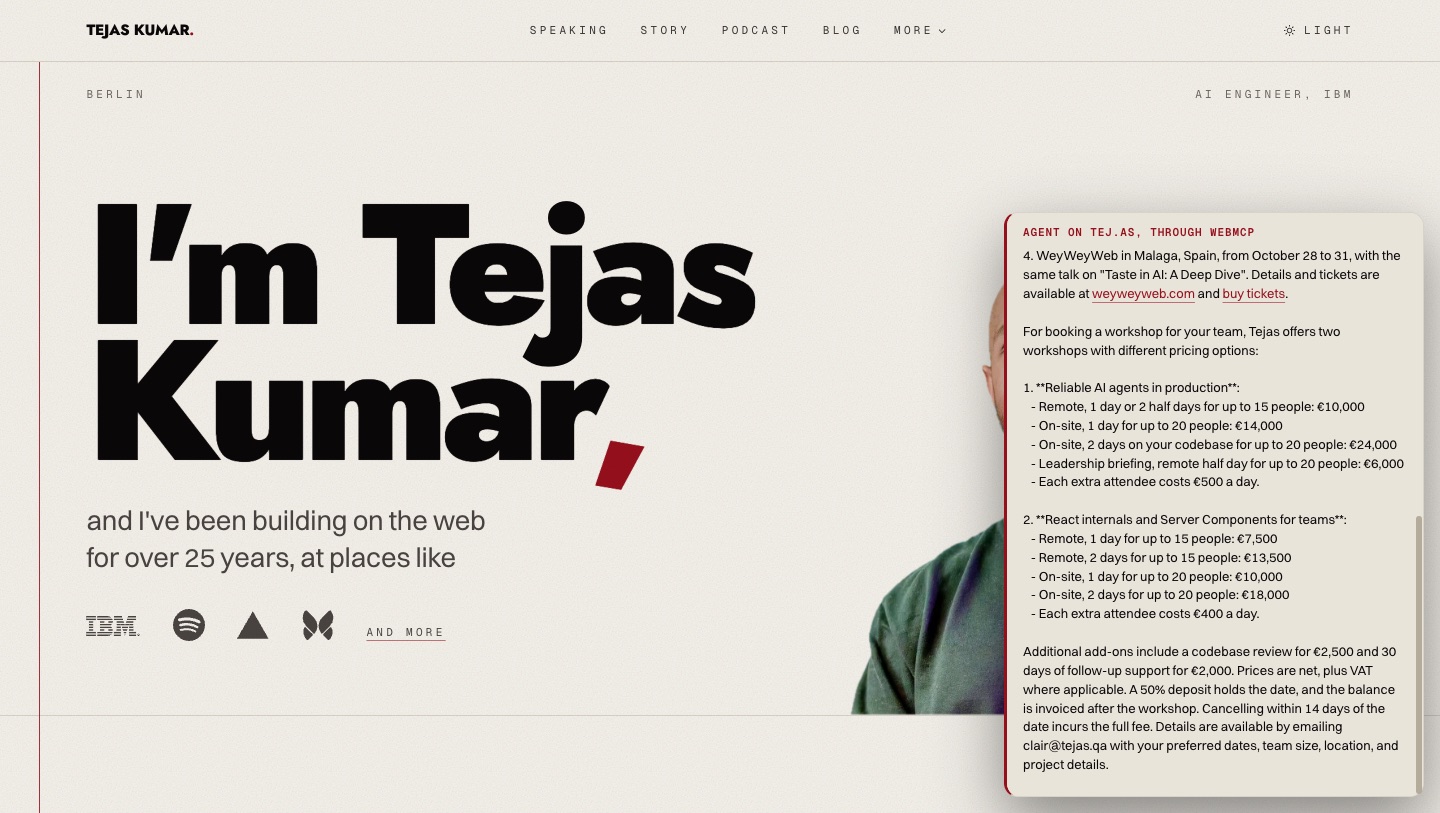
This morning I gave an AI agent that knew nothing about me except the 4 tools this site offers one question: “Where is Tejas speaking this month, and what would a workshop for my team cost?” It made 2 tool calls, get-speaking-schedule for the dates of October and get-booking-info for workshops, and came back with all 4 of my October conferences (ticket links included!) and every workshop price, straight from the data my pages show. It never had to scrape a page or read a screenshot of a pricing table. Wild.
Sarah Drasner, who leads AI and the web ecosystem for Chrome at Google, put the before and after better than I can in a post on 16 September:
Agent: screenshots the page
Agent: scrolls
Agent: screenshots again
Agent: clicks the wrong button
Agent: screenshots again
Page with WebMCP: hi, here are the 4 things you can do here, with descriptions
Agent: oh thank god
My website is literally that page now.
What is WebMCP?
WebMCP is a proposed web standard that lets a web page offer an AI agent using the browser a set of tools to call. The spec is a draft report from the Web Machine Learning Community Group at the World Wide Web Consortium (W3C). Its abstract is one sentence: “The WebMCP API enables web applications to provide JavaScript-based tools to AI agents.”
The agent is whatever the browser gives those tools to. The explainer from Chrome’s team puts it this way: “A WebMCP-aware extension (or, eventually, the browser itself) collects registered tools and presents them to the user’s agent.” So it can be an extension like the side panel Sarah built, the browser’s own assistant one day, or a program driving the browser from outside, like the demo above, which reads the tools through Chrome DevTools. Either way, it calls the page’s functions instead of clicking around.
WebMCP vs MCP: what’s the difference?
WebMCP is named after the Model Context Protocol (MCP), a client-server protocol, similar to the Hypertext Transfer Protocol (HTTP), where the client is an AI agent and the server is an MCP server. The way I explained it at How to Web, the client “talks to the server. It says, ‘Hey, what context do you have for me?’” and the server answers with its tools. WebMCP takes that idea and puts the tools in the web page you already have open, instead of on a server somebody runs somewhere else.
The 3 ways an agent can use a website, side by side:
| WebMCP | An MCP server | Screenshots and clicks | |
|---|---|---|---|
| Where the tools are | In the web page itself | On a server somebody runs, which you connect to your AI app | Nowhere: the agent reads pixels and the page’s markup and guesses |
| What the site has to build | A few functions in the site it already has | A second product next to the site | Nothing |
| What breaks it | A tool whose contract changes | The server going down | A redesign, a popup, a slow load |
| On tej.as | 4 tools since 1 October | Never built | How agents saw my site until 30 September |
Which browsers support WebMCP?
Chrome, as an origin trial from Chrome 149 (Chrome’s WebMCP docs). An origin trial is Chrome letting a site switch a feature on early for its own visitors, with a token that only works on that site’s origin (think, its domain). My token goes in a <meta http-equiv="origin-trial"> tag on every page and expires on 30 March 2027, so anybody visiting in Chrome gets the tools without flipping a flag. On localhost the token doesn’t match, so while I’m building I turn it on with chrome://flags/#enable-webmcp-testing instead.
It’s still a proposed standard, so it changes: when Chrome 149 shipped it, the API was on navigator.modelContext, and later releases put it on document.modelContext, which is where the spec has it now, so my code looks in both.
The 4 tools on tej.as
Every tool answers from the same module the pages read, so an agent quotes the sentence a visitor sees and never a stale copy of it.
| Tool | What an agent asks it | Where the answer comes from |
|---|---|---|
search-content |
What has Tejas said about React Server Components? | The search index behind the Ask boxes: my talk transcripts, the ConTejas Code podcast, Fluent React and this blog, with video links that open at the second the passage starts |
list-talks |
Which talks has he given on AI? | My talk list, with the full transcript on this site where one exists |
get-speaking-schedule |
Where is he speaking next? | The calendar behind /calendar |
get-booking-info |
What does a keynote or a workshop cost? | The fees and terms on /speaking and /workshops |
All 4 only read. Nothing here sends, books or submits anything on anyone’s behalf, and the spec has a hint for the day something does: consequentialHint, which Sarah announced in September and which Chrome’s guidance says to set for high stakes actions like “booking travel or transferring money”, so the agent asks the person first.
How I built it
All of it is about 780 lines of TypeScript in 5 files, plus a component and an API route. None of it stores data of its own: every answer comes from a module the pages already use.
1. One file has every tool’s contract
A tool is a name, a title for people, a description for the model, a JSON Schema for the input and some hints. Here’s search-content, trimmed:
// src/util/webmcp/tools.ts (trimmed)
{
  name: "search-content",
  title: "Search talks, podcast, book and blog",
  description:
    "Search everything Tejas Kumar has published: his conference talk transcripts, the ConTejas Code podcast, his O'Reilly book Fluent React and his blog. Returns the closest passages, each with a link...",
  inputSchema: {
    type: "object",
    properties: {
      query: { type: "string", minLength: 1, maxLength: 300, description: 'What to look for, in plain words, such as "agent harnesses" or "React Server Components".' },
      source: { type: "string", enum: ["all", "talks", "podcast", "book", "blog"], default: "all", description: "..." },
      limit: { type: "integer", minimum: 1, maximum: 8, default: 4, description: "..." },
    },
    required: ["query"],
  },
  annotations: { readOnlyHint: true },
}
The description says “Tejas Kumar” and “his” instead of “I” and “my”. Everything else on this site is first person, but a model reads a tool description with no page around it. A “my talks” out of context has nobody attached to the “my”.
2. The browser registers them (if it can)
<!-- src/components/WebMCP.astro (trimmed) -->
<script>
  const context = document.modelContext ?? navigator.modelContext;
  if (context && typeof context.registerTool === "function") {
    import("../util/webmcp/register").then(({ register }) => register(context));
  }
</script>
A browser without WebMCP pays for one property lookup and nothing else: the code that registers the tools only downloads after the feature test passes. Each tool’s execute then sends its input to /api/webmcp/<tool> on my server. That’s where the search index and the calendar are. Shipping them to every page would make every page heavier for every visitor, agent or not.
3. The server checks every call against the same schema
The API route imports the same tools.ts and validates the input against the schema the agent was shown before it runs anything, so what the agent is told and what the server enforces can’t drift apart.
A model is a sloppy caller though, so the validator forgives the mistakes with one obvious meaning and refuses the rest:
- an integer sent as a string (
"5") is read as the integer, - an enum value in the wrong case (
"React") is read as its listed form, - strings are trimmed and an empty string counts as not sent,
- properties the schema doesn’t name are dropped instead of refused.
4. Return mistakes (don’t throw them)
If a tool’s execute rejects, the model gets a bare UnknownError and no idea what went wrong, so every tool on this site returns its mistakes as a plain object with a sentence in it:
// src/util/webmcp/register.ts (trimmed)
const body = await response.json().catch(() => null);
if (body && body.ok === true) return body.result;
/* A mistake goes back to the model as a sentence it can correct, not as a
   rejected promise, which the browser would flatten into UnknownError. */
return { error: body?.error || `tej.as answered ${response.status}. Try again in a moment.` };
A model can fix "source" must be one of all, talks, podcast, book, blog, and got "videos". on its very next call. It can’t do anything with UnknownError.
5. Stay inside Chrome’s budgets
Chrome’s guidance gives every tool a budget: 30 characters for a name, 500 for a description, 150 for each parameter’s description and about 1,500 for what a tool returns. A test in this repo fails if a name or a description goes over. It also runs every tool against the actual data to measure the output. That’s why a search result is a passage of about 220 characters around the sentence that shares the most words with your query (on a podcast segment, the first 220 characters of a chunk are usually the tail of the previous answer).
6. Track whether anyone uses it
Every page reports a WebMCP Ready event when it registers the tools. Every call reports a WebMCP Tool event with the tool’s name, whether it worked and how long it took. The tools went live on 1 October and Chrome only offers them through an origin trial, so the only agent I’ve watched call them so far is my own demo. These events are how I’ll know when that changes.
What is WebMCP good for?
WebMCP is good for anything people already do on your page that an agent could do with one function call instead of a dozen clicks. Sarah showed it on her own app: “I can batch process, change themes and dark mode, check on higher level goals that I’m keeping track of. All of this functionality exists already!”
My fees, my calendar and my talks were already on my pages too, and the tools let an agent read them without guessing, which is the demo at the top of this post. On 28 September Shopify opened checkout to agents in the browser with WebMCP tools called get_checkout, update_checkout and complete_checkout, which places the order after the buyer authorizes it.
Sarah also built a Chrome extension that drives any site’s WebMCP tools with Jev from TypeSafe: as you type, it picks the page’s tool, fills in the arguments and tells you how sure it is. I use Jev on this site to decide whether the Ask boxes can answer a question at all, so seeing it pick tools was a fun little crossover.
How to try it on tej.as
In a recent Chrome, open any page here, then open the console in DevTools and run document.modelContext.getTools(): you’ll see the same 4 tools an agent sees. Sarah’s extension will drive them for you if you’d rather click than type.
If your team is building agents that call tools like these, that’s what my workshop on reliable AI agents in production is for, and if you’d like me to talk about AI and the web at your event, you can book me here.
Questions
What is WebMCP?
WebMCP is a proposed web standard that lets a web page give an AI agent using the browser a set of tools, each with a name, a description, a JSON Schema for its input and a function to run, so the agent calls the function instead of reading screenshots and clicking around. The spec is a draft from the World Wide Web Consortium's (W3C) Web Machine Learning Community Group, and Chrome runs it as an origin trial from Chrome 149.
What is the difference between WebMCP and MCP?
The Model Context Protocol (MCP) is a client-server protocol, similar to the Hypertext Transfer Protocol (HTTP), where the client is an AI agent and the server is an MCP server that somebody runs. WebMCP lets the web page you already have open offer tools to an agent working through your browser, so there is no extra server to run and nothing for the visitor to install or connect.
How do I add WebMCP to my website?
Call `document.modelContext.registerTool()` with a name, a description, an input schema and an `execute` function, in a browser that supports WebMCP. On my site each `execute` sends its input to an API route that checks it against the same schema and answers from the same data the pages show.
How do I enable WebMCP in Chrome?
Open `chrome://flags/#enable-webmcp-testing` in a recent Chrome, set it to Enabled and relaunch the browser: every site you visit, `localhost` included, can then register WebMCP tools. Visitors don't need the flag on a site that has joined Chrome's WebMCP origin trial, which is how tej.as offers its 4 tools to anybody in Chrome.
Which browsers support WebMCP?
Chrome supports WebMCP as an origin trial from Chrome 149, so a site that registers for the trial gets it for ordinary Chrome visitors, and you can turn it on for any site you're building with `chrome://flags/#enable-webmcp-testing`. It's still a proposed standard, and the API has already changed once, from `navigator` to `document`.
What is WebMCP good for?
WebMCP is good for anything a person already does on a page that an agent could do with one function call instead of a dozen clicks: searching, filtering, checking a schedule, booking, checking out. Shopify uses it for checkout tools that place an order after the buyer authorizes it, and I use it so an agent can search everything I've published and read my speaking schedule and prices.
Written by me, Tejas Kumar, an AI Engineer at IBM based in Berlin. Read everything else I have written, or go to Fluent React, my O'Reilly book on how React works inside, the talks I give at conferences, and ConTejas Code, my podcast.